How can I add a new service customer?
Support accurate, controlled Service & Warranty operations by completing service customer and service ticket work with complete master data, traceable approvals, and reliable downstream reporting.
دعم عمليات الخدمات والضمان والدعم الفني بدقة ورقابة من خلال استكمال بيانات عميل خدمة وتذكرة خدمة واعتماداتها القابلة للتتبع وضمان موثوقية التقارير اللاحقة.
Business objective • هدف العمل
Support accurate, controlled Service & Warranty operations by completing service customer and service ticket work with complete master data, traceable approvals, and reliable downstream reporting.
دعم عمليات الخدمات والضمان والدعم الفني بدقة ورقابة من خلال استكمال بيانات عميل خدمة وتذكرة خدمة واعتماداتها القابلة للتتبع وضمان موثوقية التقارير اللاحقة.
Detailed steps • خطوات التنفيذ التفصيلية
- Open Service Management → Setup & Operations → service customer. Choose New to open a clean entry screen.افتح إدارة الخدمات ← الإعدادات والعمليات ← عميل خدمة. اختر جديد لفتح شاشة إدخال فارغة.
- Select the company/branch context and enter the identifying values before completing descriptive or optional fields.حدد سياق الشركة والفرع وأدخل القيم التعريفية قبل استكمال الحقول الوصفية أو الاختيارية.
- Complete the screen fields shown in the field guide. Select values from lookup controls to preserve valid system codes.استكمل حقول الشاشة الموضحة في دليل الحقول. اختر القيم من أدوات البحث للحفاظ على رموز النظام الصحيحة.
- Choose Validate and resolve every red or warning message. Attach supporting documents when the company policy requires evidence.اختر تحقق وعالج كل رسالة حمراء أو تحذيرية. أرفق المستندات المؤيدة عندما تتطلب سياسة الشركة ذلك.
- Choose Save, note the generated record number, then Submit for Approval if workflow is enabled. Confirm the status becomes Active or Approved.اختر حفظ وسجّل رقم السجل الناتج ثم أرسل للاعتماد إذا كان سير العمل مفعلاً. تأكد من تحول الحالة إلى نشط أو معتمد.
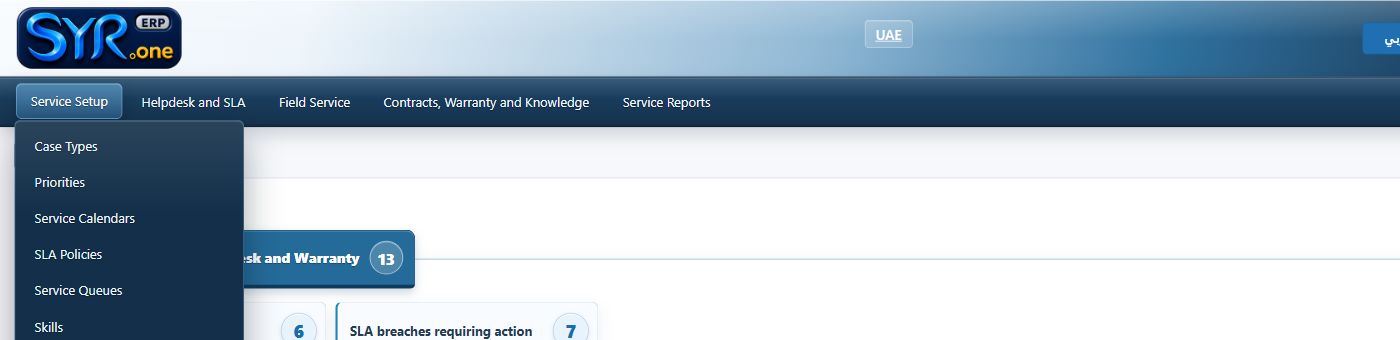
Real menu screenshot captured from the authorized syrone.local demonstration environment; labels and options may vary by tenant. • لقطة حقيقية من بيئة العرض المحلية المصرح بها على syrone.local؛ وقد تختلف التسميات والخيارات حسب إعدادات العميل.
Screen field-entry guide • دليل إدخال الحقول
| Field / الحقل | Requirement / المتطلب | What to enter / ما يجب إدخاله |
|---|---|---|
| Ticket Number رقم التذكرة | Required / مطلوب | Enter the approved ticket number exactly as defined by company policy. أدخل رقم التذكرة المعتمد تماماً وفق سياسة الشركة. |
| Customer العميل | Required / مطلوب | Enter the approved customer exactly as defined by company policy. أدخل العميل المعتمد تماماً وفق سياسة الشركة. |
| Asset/Serial الأصل/الرقم التسلسلي | Required / مطلوب | Enter the approved asset/serial exactly as defined by company policy. أدخل الأصل/الرقم التسلسلي المعتمد تماماً وفق سياسة الشركة. |
| Priority الأولوية | Required / مطلوب | Enter the approved priority exactly as defined by company policy. أدخل الأولوية المعتمد تماماً وفق سياسة الشركة. |
| SLA اتفاقية الخدمة | Conditional / مشروط | Complete sla when it applies to this record or transaction. استكمل اتفاقية الخدمة عندما ينطبق على السجل أو المعاملة. |
| Assigned Engineer المهندس المكلف | Conditional / مشروط | Complete assigned engineer when it applies to this record or transaction. استكمل المهندس المكلف عندما ينطبق على السجل أو المعاملة. |
Expected result • النتيجة المتوقعة
The record is saved with a unique reference, a valid status, complete audit history, and any required workflow or connected-module reference.
يُحفظ السجل برقم مرجعي فريد وحالة صحيحة وسجل تدقيق مكتمل مع مرجع سير العمل أو الوحدة المرتبطة عند الحاجة.
Troubleshooting • معالجة الأخطاء
If the action is unavailable, confirm company/branch context, open period, record ownership, required fields, workflow status, and role permissions. Use the validation log rather than repeatedly resubmitting unchanged data.
إذا لم يكن الإجراء متاحاً فتحقق من سياق الشركة والفرع والفترة المفتوحة وملكية السجل والحقول المطلوبة وحالة سير العمل وصلاحيات الدور. استخدم سجل التحقق ولا تكرر الإرسال دون تصحيح البيانات.